
Step 3 of 6
Code generation: a working project, not a snippet
From the approved spec, EasySeer writes the code as separate files, one per task, plus a main program with a screen to run everything. Open any file in the built-in viewer, read it and change it.
- Step
- 3 of 6
- Tool
- Claude
- Output
- A code folder with readme and requirements
- Your role
- Read it, understand it, own it
What you see in the tool
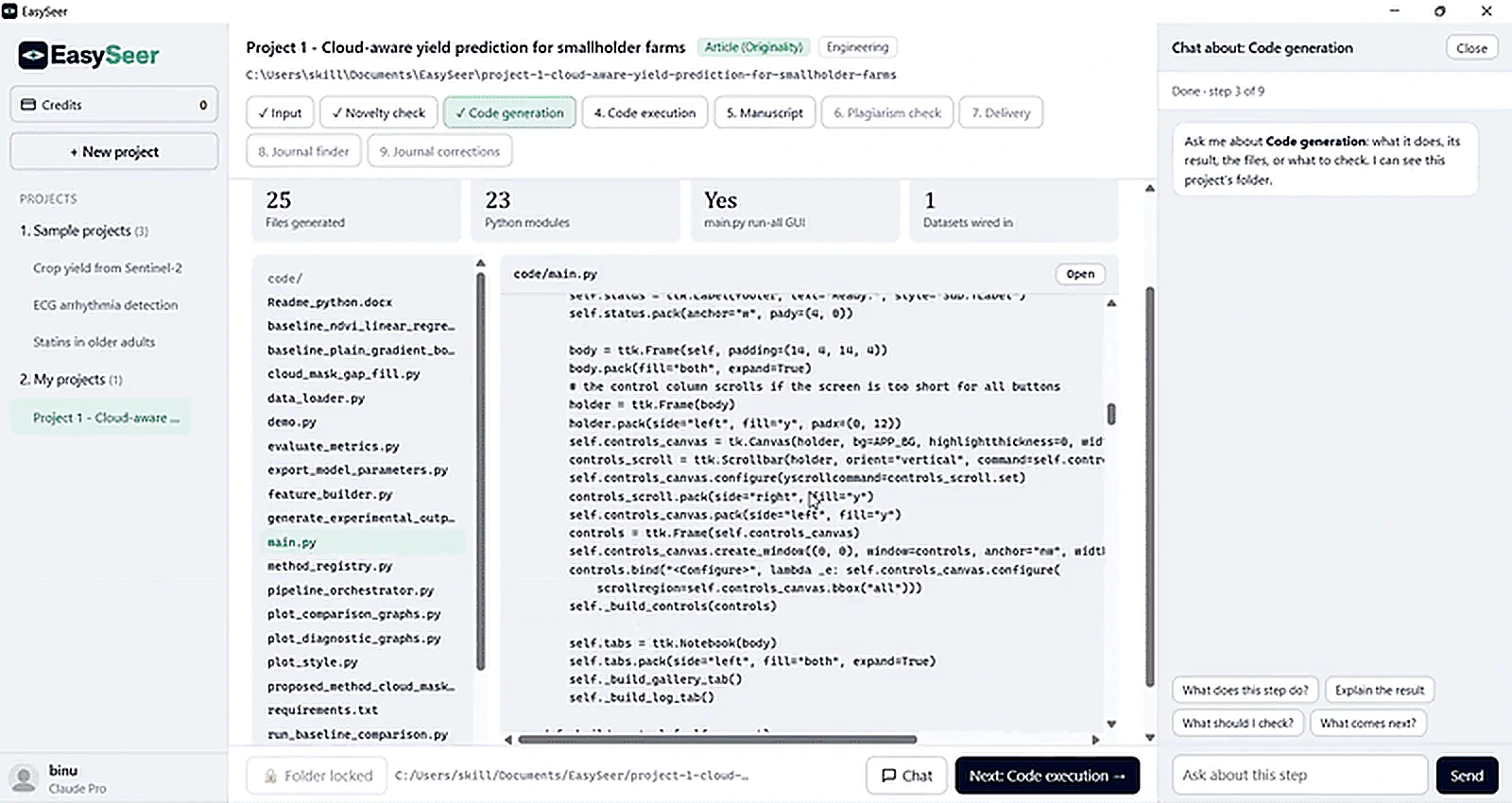
- Counts at the top: files generated, Python modules, whether main.py has a run-all screen, datasets wired in
- A file list: data loader, baselines, the proposed method, metrics, plots, an orchestrator, a demo and requirements
- A code viewer with an Open button for each file
- The chat panel to ask what a file does
Why this stage matters
Turning a method idea into working code is where many scholars lose weeks: setting up data loading, getting the method right, writing the evaluation and debugging. The code generation stage gives you a documented first draft built from your approved concept, so you start by reading and improving code instead of staring at an empty file.
Choose your tool (for example Python) and EasySeer drafts the code that follows your method idea, including data loading, the main method and the evaluation.
You can read every file. The code is a first draft for you to understand, test and own.
How it works
Choose your tool
Pick the language or environment, for example Python, in the project screen.
Generate the plan
EasySeer first lists the files it will write and the order they run in, so you can see the structure before reading any code.
Write the files
It writes data loading, the proposed method, the baselines you named and the evaluation, each with comments explaining the purpose.
Read and edit
Open any file, understand it, change it. The code is plain text that belongs to you.
Approve
Approve when you are happy. Only approved code is run in the next stage.
What you give it
- The approved concept specification
- Your chosen tool
- Your dataset description or sample files
- Baselines you want to compare against
What you get
- A project code folder with one file per task
- Comments and a short readme in plain language
- Baseline and proposed method implementations
- A results folder structure ready for the run
What you must check
- Read the code and confirm it implements your method, not a generic one
- Check the metrics and the train and test split
- Confirm the baselines are fair and configured as in their papers
Honest limits
- Generated code can contain mistakes. Reading it is part of your job.
- EasySeer drafts what your concept describes. It cannot invent a method you did not specify.
- Some specialised libraries or hardware may need manual setup on your computer.
Questions about this stage
Which programming tools are supported?
Python is available now. The project screen shows other tools as they are added.
Can I edit the generated code?
Yes. Every file is open. Edit it and run it again.
Does the code follow my concept or a template?
It follows your approved concept specification. Generic template code is not the goal.
Related guides
- How to generate and run the code: Generate code from the approved context.docx (Step 3), read it, then run it on your own computer (Step 4). Che…
Make your first project See it in the tour All features
Last updated 2026-11-09. EasySeer is AI. It creates only an initial draft from the novel concept you provide, and it is designed to follow academic ethical guidelines.